If you run a web agency, the hardest part isn't building websites — it's finding people who actually need one. Most agencies spend hours on manual prospecting that could be done in minutes with the right tool.
TL;DR: Around 64% of small businesses still operate without a website (SCORE, 2024). For a web agency, plumbers without a web presence on Google Maps are warm leads hiding in plain sight. We ran this exact search for California, found 65 no-website plumbers in under 5 minutes, and exported them as a clean CSV — which you can download free at the bottom of this article.
Why plumbers without websites are your best agency prospects
Plumbers are one of the most underserved categories online. According to a 2024 SCORE report, roughly 64% of small businesses in trades and services still have no website — they rely entirely on word of mouth and Google Maps listings to drive calls.
That gap is your opportunity. A plumber with a Google Maps listing, real reviews, and zero web presence is already doing something right. They have customers. They have a phone number people call. What they don't have is the digital infrastructure to scale — and that's exactly what you sell.
The key question for any web agency is: how do you find these businesses fast, at scale, without spending an afternoon scrolling Google Maps?
In our experience, the no-website filter is the single highest-intent signal you can get in outbound prospecting. These businesses aren't indifferent to having a website — most just haven't had anyone make the case yet.
How we found 65 plumbers without a website in California in under 5 minutes
We used the LeadsAgent Chrome extension for this test. Instead of manually searching Google Maps and copying data row by row, we described the search to the AI in plain language and let it run.
Step 1 — Tell the AI what you're looking for
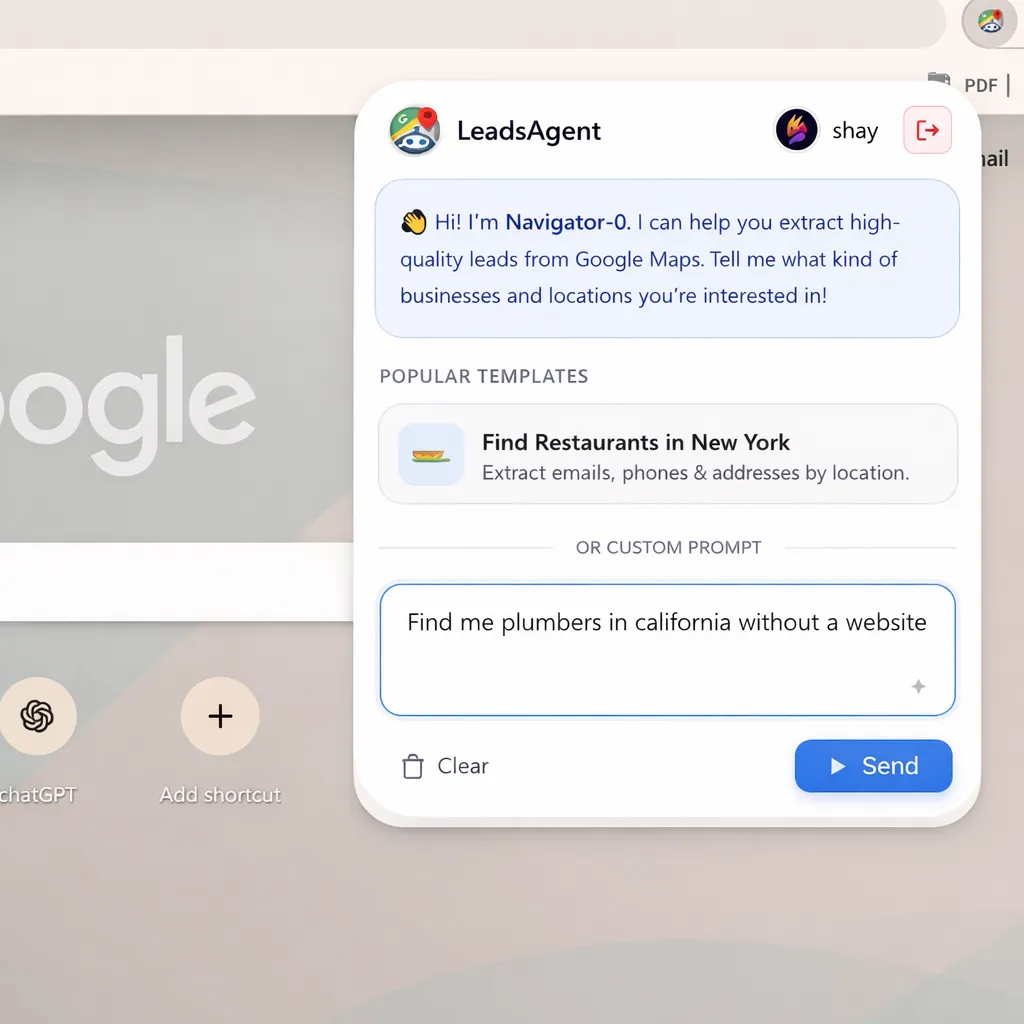
Open the LeadsAgent extension and type your target into the prompt field. For this search we used:
"Find me plumbers in California without a website"
The AI interprets this, sets up the Google Maps search, and applies the no-website filter automatically. No configuration, no settings to fiddle with. (It works the same way whether you're targeting plumbers, electricians, or HVAC contractors — see our full guide on finding web design clients using Google Maps for the complete playbook.)
According to a 2024 BrightLocal consumer survey, 98% of people used the internet to find local service businesses — yet tens of thousands of those businesses still have no site. California alone has over 14,000 registered plumbing contractors, and a significant portion of them are Maps-listed but website-free.
Step 2 — The extension runs autonomously
Press start. LeadsAgent scrolls through Google Maps listings, checks each business for a website link, and collects only the ones with no web presence. It runs in the background — you can switch tabs and come back when it's done.
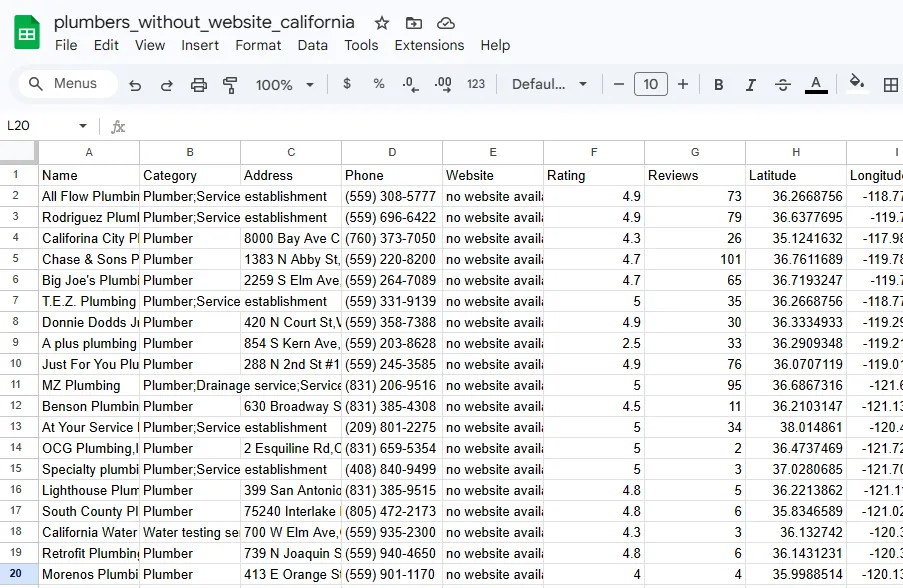
The extension extracted name, phone number, full address, star rating, and review count for each business found.
Step 3 — Export and download
When the extraction finishes, click download. You get a clean CSV with every plumber's contact details — ready to import into your CRM, cold email tool, or outreach spreadsheet.
In our California test run, LeadsAgent found 65 plumbers without a website in approximately 5 minutes of extraction time.
What does the exported data look like?
Each row in the CSV includes the following fields:
| Field | Notes |
|---|---|
| Business name | Exact name as listed on Google Maps |
| Phone number | Direct line, ~85% coverage |
| Full address | City + state + ZIP |
| Star rating | Out of 5 |
| Review count | Total Google reviews |
| Website | Blank for all rows (no-website filter active) |
The website column being blank is intentional — it's your qualifying signal. These are businesses that show up in search, have real customers leaving reviews, and have no web presence at all. That's a warm lead.
How should a web agency reach out to a plumber without a website?
You've got the list. Now what?
Lead with their specific situation, not your pitch. Something like: "I noticed you have 4.3 stars and 47 reviews on Google Maps, but no website. Customers who search for you by name right now land on a competitor. I help plumbers fix that — want to see what your site could look like?"
That's more effective than any generic cold email, because it's specific to them. The rating, the review count, the lack of a site — all of it is verifiable data you got from the same export. (For a full breakdown of the closing process once they're interested, read our guide on selling websites to local businesses.)
A few things that improve your reply rate:
- Target mid-range ratings. Plumbers with 3.5–4.5 stars are established enough to pay for services but still have room to grow. The 5-star businesses with 400+ reviews are often already locked in with an agency.
- Prioritise businesses with 20+ reviews. Higher review counts signal an active business that's generating revenue. They're more likely to invest in growth.
- Personalise the subject line. Using the business name and their city in the subject line alone can lift open rates significantly.
According to a 2025 HubSpot sales benchmark, personalised first-touch emails generate 6x higher transaction rates than generic ones. The data you have from the LeadsAgent export makes that personalisation trivially easy.
Who else should web agencies be targeting with this filter?
Plumbers are a strong starting point, but the no-website filter works for any local service trade. Other high-opportunity categories in a typical Google Maps search:
- Electricians
- HVAC contractors
- Landscapers
- Roofers
- Painters
- General contractors
All of these share the same profile: local businesses that rely on reputation and referrals, have verifiable Google Maps presence, and haven't yet made the jump to having a real website. Your pitch writes itself.
From what we've seen, trades businesses are also significantly easier to close than restaurants or retail — they have consistent cash flow, defined service areas, and a clear reason to want more incoming calls. (We took a deeper look at the plumbing category specifically in our post on generating plumber niche leads from Google Maps, including average deal sizes and outreach scripts.)
Download your leads
The CSV from our California plumber extraction is available below. It contains 65 plumbers without a website, with phone numbers, addresses, star ratings, and review counts — ready to use.
Free Download
65 California Plumbers Without a Website
Phone numbers, addresses, star ratings, and review counts — extracted from Google Maps. Ready to import into your CRM or cold email tool.
Download CSV — Free
Want to run the same search for your own city or trade? Install LeadsAgent free — 1,000 leads per month, no card required.
FAQ
How many plumbers without a website can I find with LeadsAgent?
The number depends on your target city and how saturated the market is. In our California test we found 65 within 5 minutes across a broad state-wide search. Narrowing to a single metro like Los Angeles or San Diego typically returns 20–40 results. Running the same search every 60–90 days surfaces new listings as businesses open and update their Maps presence.
Is this data legal to use for outreach?
Yes. LeadsAgent collects publicly visible information that businesses have posted on Google Maps themselves — the same data anyone can see by searching manually. Using publicly available contact details for business-to-business outreach is standard practice and legal in most jurisdictions. We recommend reviewing CAN-SPAM guidelines if you're sending cold email.
Do I need any technical skills to use LeadsAgent?
No. The extension is installed in Chrome or Edge like any other browser add-on. Once installed, you describe what you're looking for in plain English, press start, and it does the rest. There's no configuration, no scraping code, no API keys.
Read next
If this is your first time using LeadsAgent, the step-by-step guide below walks through the full extraction process — from install to your first exported list:
How to Use LeadsAgent: Extract Google Maps Leads in 3 Steps →
For a broader playbook on building an agency lead pipeline from Google Maps data — including how to segment, filter, and prioritise your lists — see:
How to Extract Leads from Google Maps: A Practical 2026 Guide →